


|
While using computers, many a time we face the problem, how to type in Bengali, when we have traditional Roman/ Latin/ English / QWERTY keyboard. We might be using facebook or writing a mail; we want to right our message or want to convey our thoughts in our language. Earlier we used to take help of various fonts for typing our language. But in case, our computer keys did not have compatible signs; it was very cumbersome for all of us to remember which button indicated which letter in our beloved language. Many a time, members of our facebook group ‘Astro Devam’ as well as visitors to our page ‘Astro Devam’ have also communicated such issues. Now, with the help of a Google Free Tool, it has become very easy for all of us. This input tool combines transliteration facility, Input Method Editor as well as on-screen Keyboard. It is wonderful for all of us, who want to use our mother tongue as means of communication on internet. We just have to type phonetically similar English words on our keywords, or in other words, we have to type our words in a way they sound, using English letters and Google input tool will transform all this into script of our beloved Bengali. How to install this Input tool: At first, go to the following link: http://www.google.co.in/inputtools/windows/
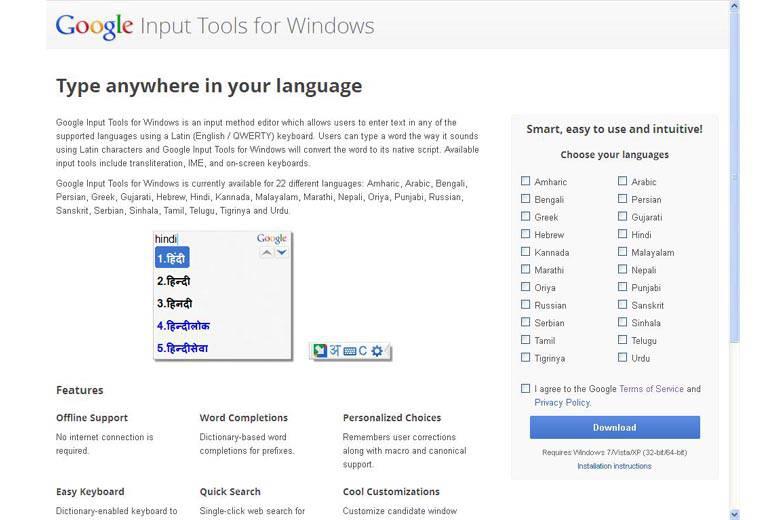
Follwing window will appear:
On the right side, there is a list of languages. Choose your language and tick before it. Then tick the box given below the list before the sentence ‘I agree to the Google Terms of Service and Privacy Policy’.
Now, click to the download button. After this click, a window will appear which will ask you whether you want to save this file. Click to the button ‘Save file’ in this window.
After download is complete, if you click to downloaded material, another window will appear asking you, whether you want to run this file. Click to the ‘Run’ button and yippee! the tool will be installed on your PC or Laptop. After installation, button will appear on the right side of the screen on your task bar, by which you can change your keyboard from English to Bengali and vice versa. Even you can open an onscreen keyboard, which has all the unique features of your unique language Bengali. This is very user friendly, just try that. The procedure detailed above is long in description, but easy in implementation. So Go ahead! Now, you can type anything in Bengali; in Facebook, in your mails, in your letters and anywhere else, on your computer. |


Share this post
About the Author

Written by AstroDevam Team. Keep visiting for regular posts on Astrology, Vastu Shastra, & more...
How to type in Bengali from English Keyboard




Topics
- Akshaya Tritiya
- Aura Scanning
- Real Rudrakshas
- Pitra Paksha, Shraddh, Kanagat
- Navratri
- Shubh Muhurat
- Significance of Parad Idols
- Dussehra, Diwali, Dhanteras, Bhai Dooj
- Planetary Transits, Retrograde & Direct Movements
- Logo Shastra
- Vastu Shastra
- Festivals
- Mahashivratri
- Vastu Pyramid Yantras
- Yantra
- Astrology
- Gemstone
- Teej
- Nag Panchami
- Vedic Yagya
- Janmashtami
- Daily Prediction for 12 Zodiac Signs
- Daily Numerology Predictions for all Numbers
- Weekly prediction for all zodiac sign
- Solar Eclipse
- Karwa Chauth
- Diwali
- Vastu Tips
- Tulsi Mala
- Religious
- Chaitra Navratri
- Free Tips
- Rakshabandhan
- EKADASHI
- Ganesh Chaturthi
Tags

Comments